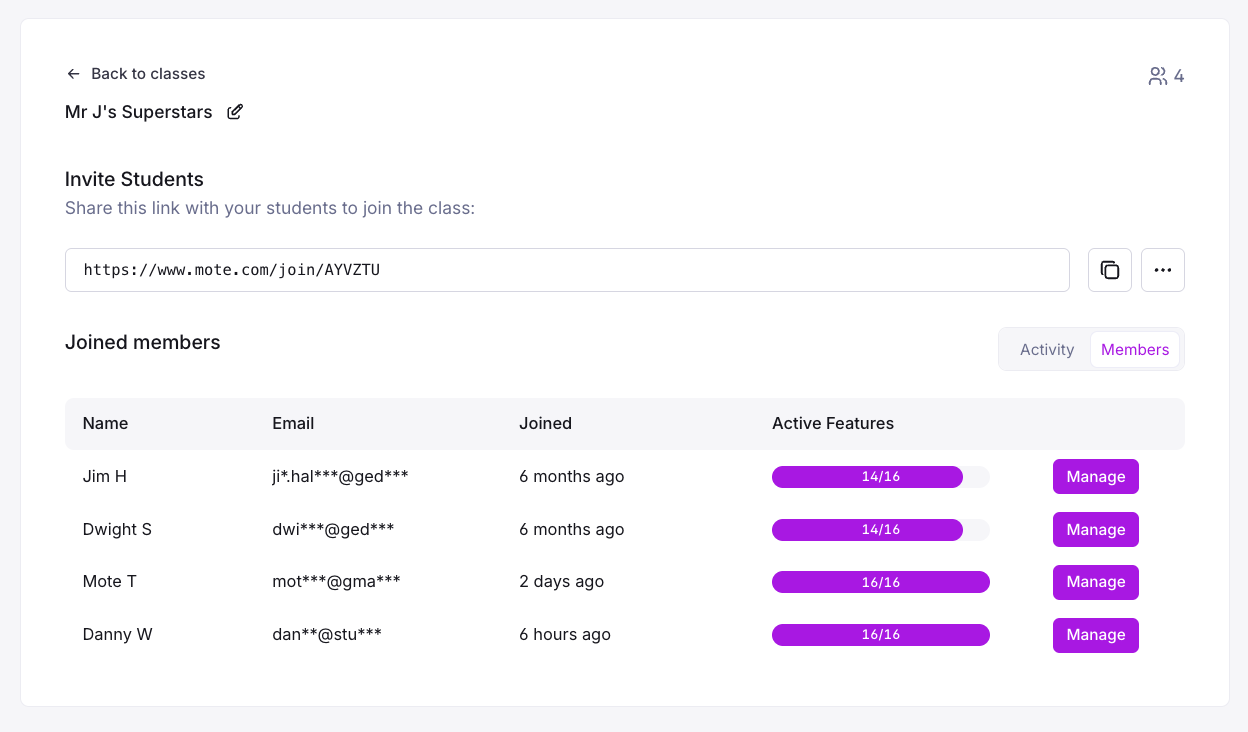
Teachers can enable or disable specific Mote features for their individual classes or individual students. This allows for differentiated instruction and ensures students only have access to tools appropriate for their learning needs and lesson objectives.
 Teacher Feature Controls
Enable or disable sidebar features for classes and individual students
Overview
What this Feature Does
Why it Matters
- Enables differentiated instruction by customizing tools for specific classes or students
- Supports lesson-specific controls to focus student attention on appropriate tools
- Allows individualized support for students with different learning needs
- Provides classroom management tools to maintain appropriate usage
MTSS:
- Tier 1: Supports all students with appropriate tool access for their class
- Tier 2/3: Enables targeted support through customized feature sets for individual needs
Bonus Points
Select 'Apply these settings to all members of my class' to quickly update class settings for a test or assessment activity/
Explore More Features
Discover related capabilities and features in the mote ecosystem

Related Features

Assessment Mode
CapabilityAssessment Mode lets a teacher pause Mote features for the duration of an assessment. The teacher ch...
Learn more

Google Classroom Class Import
CapabilityGoogle Classroom Class Import pulls a teacher's existing classes into Mote, mapping students to thei...
Learn more

School Language
CapabilitySchool Language is an account-level setting that fixes the default language of Mote itself for every...
Learn more

Impact Report
CapabilityThe Impact Report takes an institution's Mote usage data and turns it into a picture of what is actu...
Learn more
More from Mote Chrome Extension
Localized Interface
Core FeatureLocalized Interface means Mote itself, not just the content it handles, is available in French, Span...
Learn more

Mote Writing Review
Core FeatureMote Writing Review checks a student's writing for spelling, homophones (their / there / they're), s...
Learn more

Focus Mode
Core FeatureFocus Mode strips away unnecessary elements from webpages, keeping only the main content visible. Wh...
Learn more

Text Prediction
Core FeatureText Prediction offers real-time word suggestions as students type, drawing on phonetic spelling and...
Learn more