Best Text-to-Speech Tools for Education
The top TTS tools for K-12 classrooms, ranked by voice quality, education features, and student privacy.
Find out more about
Text-to-Speech



The top TTS tools for K-12 classrooms, ranked by voice quality, education features, and student privacy.
March 6, 2026
The best text-to-speech tools for education do more than read words aloud. They support reading fluency, comprehension, and accessibility across every assignment and every student. With dozens of TTS options available, schools need to evaluate beyond voice count and focus on what matters in the classroom: natural voices, student privacy, integration with Google Workspace, and alignment with frameworks like MTSS and UDL. Research from the International Dyslexia Association confirms that TTS is an evidence-based accommodation for students with reading difficulties, making the right tool selection a compliance decision as much as a pedagogical one.

Consumer TTS tools prioritize content creators and audiobook listeners. Education TTS tools need teacher controls, admin deployment, and integration with Google Classroom.

The best tools support all three MTSS tiers: universal access for every student, targeted scaffolds for struggling readers, and intensive supports for students with IEPs.

Schools must verify FERPA and COPPA compliance before deploying any TTS tool. The right vendor will have signed the Student Privacy Pledge and provide transparent data policies.

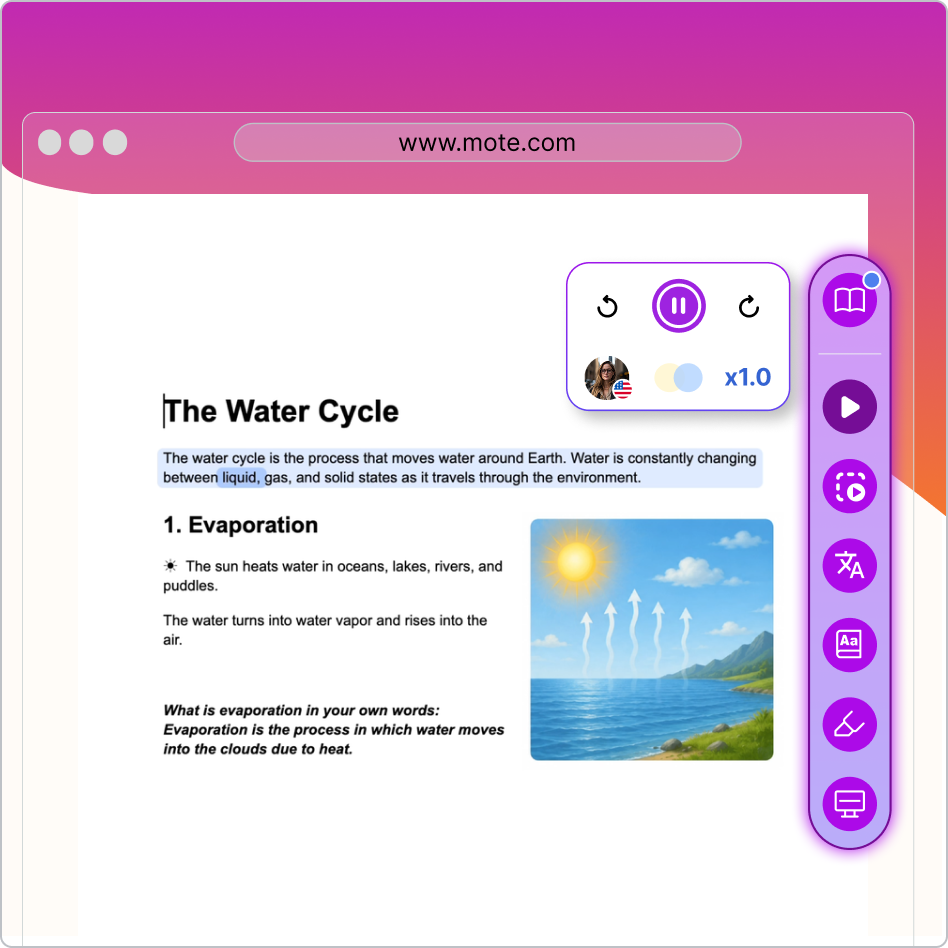
Word-level highlighting paired with audio creates a dual-channel learning experience. Students see and hear each word simultaneously, building fluency and decoding skills.

The most effective tools bundle TTS with complementary supports like Screen Mask, Highlighter, and Dictionary to address multiple reading barriers at once.

The best TTS tools for education go beyond English. K-12 classrooms increasingly serve multilingual learners, and grade-level access depends on hearing content in a student's home language as well as English. Look for natural AI voices across 60+ languages, inline translation, and a dictionary that handles bilingual learners, not just monolingual TTS.
Identify which tiers you need to support. A tool that only offers basic TTS may cover Tier 1 but leave gaps at Tier 2 and Tier 3 where students need intensive reading intervention.
Request FERPA and COPPA documentation from each vendor. Check whether the tool collects student data, serves ads, or shares information with third parties.
If your school uses Google Classroom, test each tool inside Docs, Slides, and Classroom assignments. Native integration means less friction for students and teachers.
Ask whether the tool supports Google Admin Console deployment. Manual installation across hundreds of Chromebooks is not sustainable for IT teams.
Run a two-week pilot in a few classrooms. Collect feedback on voice quality, ease of use, and whether students actually use the tool independently.
Add Mote from the Chrome Web Store and deploy across your district via Google Admin Console. Students get immediate access to Read Aloud, Screen Mask, Highlighter, and more.
We evaluated the leading TTS tools available to K-12 schools across four categories: voice quality and naturalness, education-specific features, student privacy compliance, and depth of classroom integration. Here is how they compare.
Mote is the best text-to-speech tool for K-12 schools that run on Google Workspace. It goes beyond basic TTS with a full reading support toolkit -- including Screen Mask, Highlighter, Dictionary, and Translation -- all aligned to MTSS tiers and deployable district-wide. Read&Write from Texthelp is the strongest alternative for districts on Canvas or Schoology that need a broader AT suite with tools like word prediction and screenshot reader. But for Google Workspace schools that want focused, easy-to-use reading support that students and teachers adopt quickly, Mote is our top recommendation. Try Mote free from the Chrome Web Store.
MTSS implementation benefits from tools that span all three tiers. At Tier 1, universal access tools like text-to-speech, highlighters, and screen masks give every student reading support. At Tier 2, targeted tools like translation and dictionary features help specific groups such as English Language Learners. At Tier 3, intensive supports like text prediction (supported in English, Spanish, and French) and voice typing address individual needs. Mote provides all of these within a single Chrome extension that works inside Google Workspace.
Google Docs includes a built-in text-to-speech feature under Tools > Audio > Listen to this tab. However, it is limited to English, available only in select regions, and works only on desktop with no text highlighting or speed customization. For broader language support and reading tools, Chrome extensions like Mote provide text-to-speech with 60+ languages and features like text highlighting directly inside Google Docs.
Schools use data-based decision making to determine tier movement. Universal screening identifies students who may need additional support, and ongoing progress monitoring tracks whether interventions are working. If a student is not responding to Tier 2 intervention after a defined period, the MTSS team reviews the data and may recommend moving to Tier 3. Students can also move back to lower tiers as they make progress.
MTSS stands for Multi-Tiered System of Supports. It is a proactive framework that schools use to identify struggling students early and provide increasingly intensive levels of support - from whole-class instruction (Tier 1) to small-group intervention (Tier 2) to individualised, intensive support (Tier 3). The goal is to meet every student where they are rather than waiting for them to fall behind.

.png)
.png)
.png)
